
CSS Minifier and Unminifier Tool
Optimize your stylesheets with this fast and easy CSS minifier and unminifier tool. Whether you want to reduce CSS file size for better page speed or convert compressed code into a readable format for editing, this tool helps you do both in seconds. It removes unnecessary characters to improve performance and also restores structured formatting for debugging and development workflows, making it ideal for developers, designers, and website owners.
Free online tool • No signup • Instant results

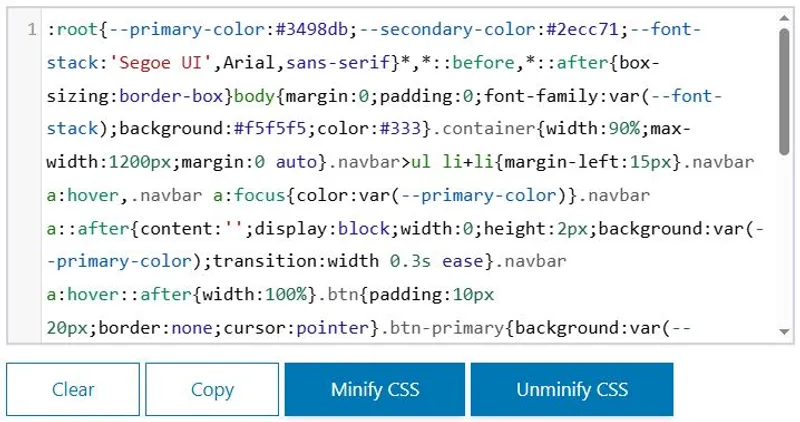
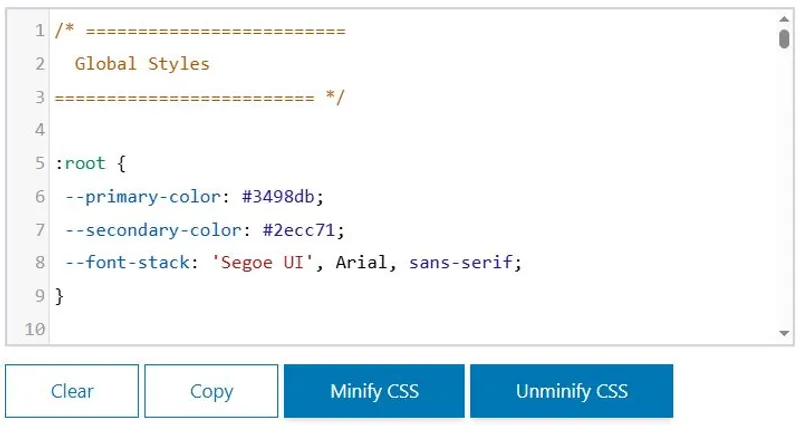
CSS Minifier and Unminifier
Online CSS Optimization Tool
Version 1.0.0
This CSS minifier and unminifier tool helps you optimize stylesheets directly in your browser. Reduce CSS file size for faster loading websites or convert compressed CSS into a clean, readable format for editing and debugging. No installation required, fully online, and designed for quick and efficient workflow.
Starting from: $0
Free: Use CSS minify and unminify features instantly without signup or limits.
Key Features
- Instant CSS minification to reduce file size and improve page speed
- Unminify compressed CSS into structured and readable format
- Works fully online with no installation required
- Clean output suitable for debugging and editing
- Fast processing for both small and large CSS files
Access: Online Web App
Frequently Asked Questions

Optimize CSS Now
Minify CSS to reduce file size and improve loading speed instantly. Unminify CSS to make your code clean and easy to edit. Start optimizing your stylesheets online with a fast and simple tool.
Minify or Unminify CSSA CSS minifier is an online tool that removes unnecessary characters such as spaces, comments, and line breaks from your stylesheet. This reduces file size and helps browsers load CSS faster, improving page speed and overall website performance. Using a CSS minifier online is one of the simplest ways to optimize frontend assets without changing functionality.
A CSS unminifier converts compressed CSS into a clean, structured format that is easy to read and edit. This is useful when working with production code where formatting is removed. Developers can quickly understand styles, fix layout issues, and modify rules efficiently using a CSS unminify tool online.
Yes, a reliable CSS minifier online tool processes your code directly in the browser without storing or sharing data. This ensures your stylesheet remains private. Always choose tools that do not require uploads or external processing to keep your CSS secure while optimizing file size.
Yes, this CSS minifier and unminifier tool is designed to handle both small and large CSS files efficiently. It quickly compresses stylesheets to reduce file size or restores them to readable format, making it ideal for developers working on complex websites or large-scale projects.
CSS minify reduces the size of a stylesheet by removing unnecessary characters, while CSS unminify restores the code into a readable structure with proper spacing and formatting. Both processes are essential for optimizing performance and maintaining code during development and debugging.
No installation is required. This is a fully online CSS minifier and unminifier tool that works directly in your browser. You can paste your CSS code, process it instantly, and copy the result without downloading any software or setting up additional tools.
No, CSS minification does not change how styles function. It only removes extra characters that are not required for execution. Your website design and layout remain exactly the same, while the optimized CSS file loads faster and improves performance.
Yes, this online CSS optimizer allows you to minify or unminify code instantly. It is useful for real-time testing, quick edits, and performance improvements. Developers can refine stylesheets on the go without switching between multiple tools or environments.
Minified CSS is difficult to read because all formatting is removed. Unminifying CSS restores proper indentation and structure, making it easier to understand and modify. This is especially helpful when debugging issues or updating styles in existing projects.
Yes, this CSS minifier and unminifier tool is completely free to use. You can optimize CSS code, reduce file size, and convert compressed stylesheets into readable format without any cost, signup, or usage limits, making it ideal for developers and website owners.
CSS Optimization Guide
Optimize CSS Fast
Reduce CSS file size and improve page speed instantly. Format your stylesheets for easy editing and debugging. Use a fast online tool with no setup required.
Start CSS OptimizationWhat is CSS Minification
CSS minification is the process of reducing the size of a stylesheet by removing unnecessary characters such as spaces, comments, and line breaks. This helps websites load faster by decreasing file size without affecting how styles are applied. Using a CSS minifier online ensures better performance and improved user experience across devices.
What is CSS Unminification
CSS unminification converts compressed CSS code back into a readable format with proper spacing and structure. This is useful for developers who need to edit or debug styles efficiently. A CSS unminify tool allows you to quickly understand and modify production-level code without confusion.
How It Works
Using this CSS minifier and unminifier tool is simple and fast:
- Paste your CSS code into the input field
- Click on “Minify” to compress the stylesheet
- Click on “Unminify” to restore readable formatting
- Copy the processed CSS and use it in your project
This process works instantly in your browser without any setup.
Benefits of CSS Minify and Unminify
- Reduces CSS file size for faster page loading
- Improves website speed and performance
- Makes debugging easier with readable code
- Helps maintain clean and structured stylesheets
- Works instantly without installing any software
Optimizing CSS is a key step in improving frontend performance and SEO.
Use Cases
This CSS optimizer tool is useful for different types of users:
- Web Developers: Optimize stylesheets for production
- Frontend Engineers: Debug and edit compressed CSS
- Bloggers: Improve website speed and loading time
- Agencies: Handle large CSS files efficiently
It supports both small projects and large-scale websites.
Tool Features
- Fast CSS minifier and unminifier online
- No signup or installation required
- Works directly in your browser
- Supports large CSS files
- Clean and simple interface for quick use
This tool is designed for speed, simplicity, and accuracy.
CSS Minifier vs Manual Optimization
Manual CSS optimization requires time and attention to detail, especially when working with large files. A CSS minifier tool automates this process instantly, reducing errors and saving effort. Similarly, unminifying manually is difficult, while an online tool restores structure in seconds.

